
Phishing, Smishing, and Fake Order Confirmations: Scam Tactics Explained
A plain-language reference covering the most common digital fraud techniques used to steal payment information from online shoppers.
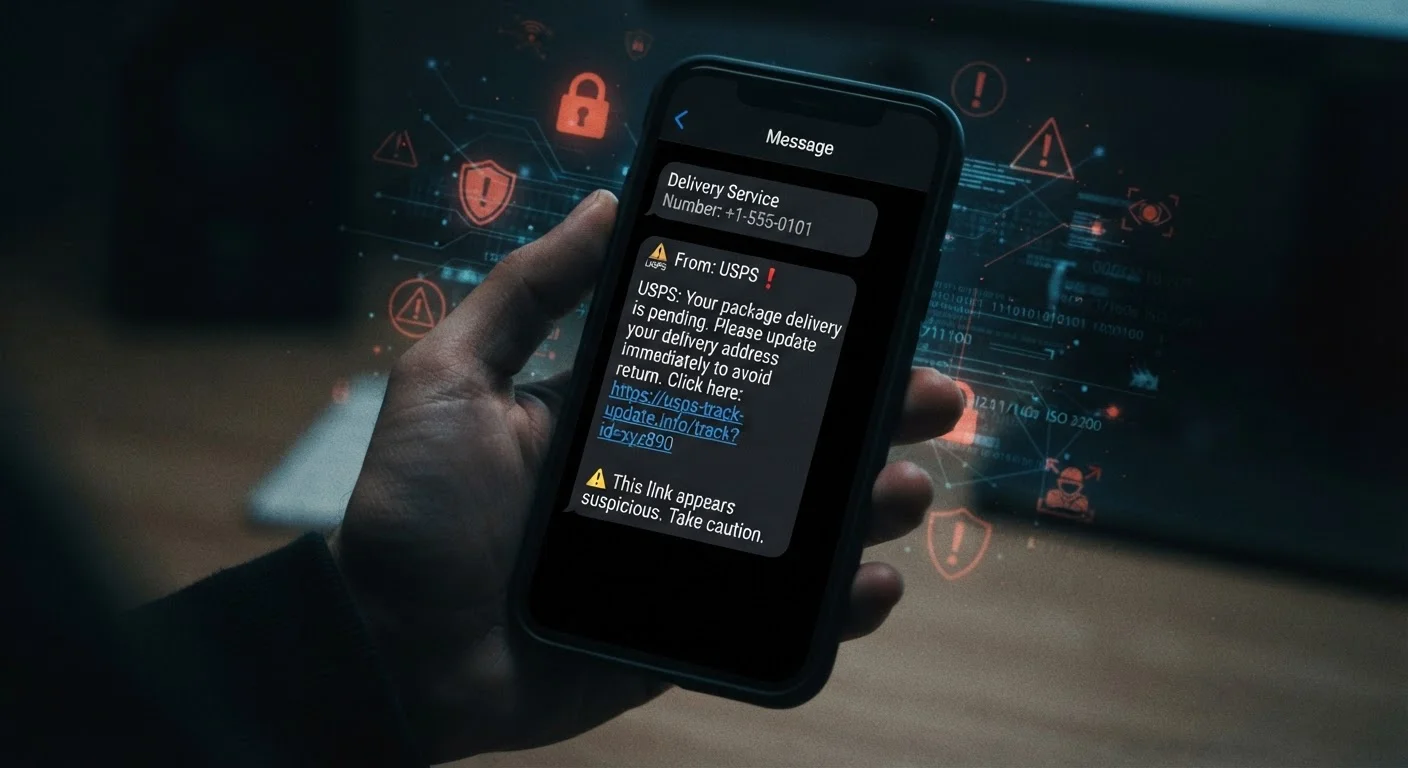
Photo: FaqsDrive.com | Smart Way To Search editorial
—— In This Article
What These Scam Tactics Actually Are
Digital fraud targeting shoppers has three dominant forms: phishing, smishing, and fake order confirmations. Each one exploits a different communication channel, but they share the same goal — tricking you into handing over payment details, login credentials, or personal information. Understanding what makes each tactic distinct is your first line of defense.
Phishing
A type of fraud where scammers send emails impersonating trusted companies or institutions to trick recipients into revealing personal information or clicking malicious links.
Smishing
Phishing conducted via SMS text messages. Scammers send fake alerts or offers to mobile numbers, urging recipients to click links or provide sensitive data.
Spoofing
The practice of disguising a sender's identity — whether an email address, phone number, or website URL — to make a fraudulent message appear to come from a legitimate source.
Credential Harvesting
A scam technique where a fake login page collects the usernames and passwords you enter, sending them directly to fraudsters instead of logging you into the real site.
Social Engineering
Manipulation tactics that exploit human psychology — urgency, fear, trust, or curiosity — rather than technical exploits, to get people to act against their own interests.
These scams succeed because they're designed to look routine. A message about a delayed shipment or a familiar retailer's logo can be enough to lower your guard. For a deeper look at the psychological tricks behind these attacks, see how scammers make fake offers convincing.
Phishing: Fraudulent Emails Disguised as Trusted Sources
Phishing uses email to impersonate a legitimate company — a retailer, a bank, a shipping carrier — and prompt you to click a link or open an attachment. The email may look nearly identical to real communications, complete with logos, standard formatting, and plausible sender names.
| Most common delivery channel | Email (phishing), followed by SMS (smishing) (FBI Internet Crime Complaint Center (IC3)) |
| Common impersonation targets | Shipping carriers, major retailers, banks, and government agencies |
| What scammers are after | Payment card numbers, login credentials, and Social Security numbers |
| Safest response to a suspicious link | Do not click — navigate directly to the official website manually |
| Where to report phishing/smishing | ReportFraud.ftc.gov (FTC) and the Anti-Phishing Working Group at reportphishing@apwg.org (U.S. Federal Trade Commission) |
Key warning signs in phishing emails:
- The sender's actual email domain doesn't match the company it claims to be from (e.g., support@amaz0n-help.net instead of a real domain)
- Urgent or threatening language — "Your account will be suspended" or "Verify now to avoid a charge"
- Links that lead to a URL different from what the visible text implies — hover over links before clicking
- Requests for your full credit card number, Social Security number, or password via email
Legitimate companies do not ask for sensitive credentials over email. If a message seems urgent, go directly to the company's official website by typing the address yourself — never by clicking the link in the email.
Smishing: Scam Text Messages on Your Phone
Smishing (SMS + phishing) delivers the same deception through text messages. Because many people treat texts as more personal and immediate than email, smishing can feel more convincing. Common scenarios include fake package delivery notifications, bank fraud alerts, and prize claims.
How to spot a smishing attempt:
- The message comes from a random phone number or a string of digits that doesn't match a recognizable business shortcode
- It includes a shortened or unfamiliar URL and urges you to click it quickly
- It claims there's a problem with a delivery, payment, or account you don't recognize
- It asks you to confirm personal details to "release" a package or "unlock" an account
Never click links in unsolicited text messages. If a delivery notification seems legitimate, open your shipping carrier's official app or website and enter your tracking number manually. Common assumptions that leave shoppers vulnerable include trusting a message simply because it mentions a real company name.
Fake Order Confirmations: Exploiting Purchase Anxiety
Fake order confirmations arrive as emails or texts claiming you've been charged for something you didn't buy. The goal is to make you panic and call a phone number or click a cancellation link — both of which lead to a scammer collecting your data.
The Contact Info in the Message Is the Trap
When a fake order confirmation includes a customer service number or cancellation link, those details are controlled by the scammer — not any real company. Calling that number connects you to a fraudster, and clicking the link may install malware or lead to a fake login page. Always find contact information through the company's official website, accessed independently.
What to do if you receive one:
- Do not call any phone number listed in the message
- Do not click any link in the message
- Log into your actual account (via the official website or app) and check your real order history
- Check your bank or credit card statement directly for any unauthorized charges
- If a charge did occur without your knowledge, contact your bank or card issuer directly
This tactic works because it creates urgency around money. Slowing down and verifying through official channels — not the contact information inside the suspicious message — is the only safe response. For a broader look at recognizing and recovering from these schemes, the online shopping scam protection field guide covers the full picture.

Smart Shopping Editorial Team
Smart Shopping Editorial Team is the collective byline for our editorial team and contributor network. Articles published under this byline or an editorial pen name are researched, written, and reviewed according to our editorial standards for clarity, consistency, and independence before publication.
View author profile